Python实现半自动账单分类
从支付宝和微信导出了账单,为了统一管理,所以必须对分类进行统一,但是分类又杂乱无章,因此自定义一级分类一级子类,采用dropdown的方式直接点选,个人觉得比excel好点一些,因为我完全没研究过那玩意儿。
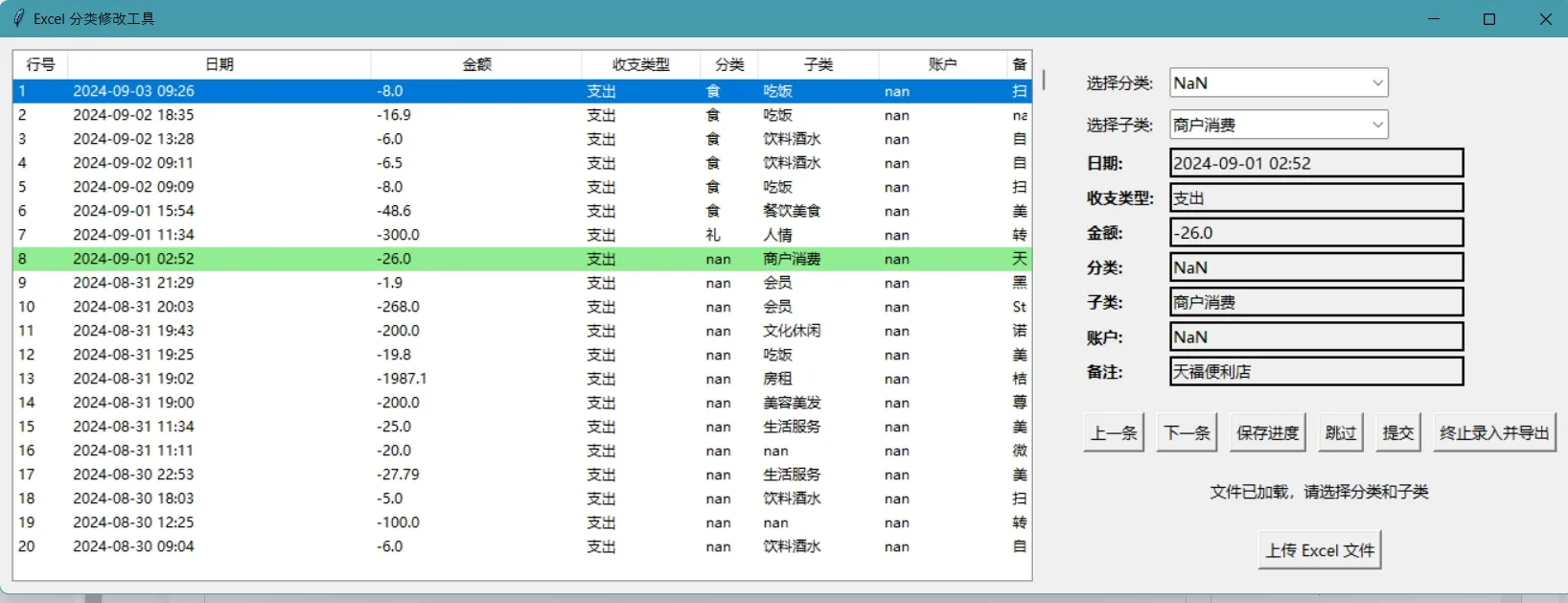
Features:
1.可以存档,没做完的下次再做;
2.无错误数据直接跳过;
3.可随时终止提交导出数据;
4.右侧原excel绑定右侧操作数据高亮展示;
import pandas as pd
import tkinter as tk
from tkinter import ttk, filedialog, messagebox
import json
import os

categories = {
    '收入': ['退款', '红包', '网站', '转账'],
    '支出': {
        '衣': [],
        '食': ['吃饭', '饮料酒水', '烟'],
        '住': ['酒店', '房租','日用百货'],
        '行': ['飞机', '火车', '公交', '电动车费用'],
        '娱乐': ['网费','电影','会员'],
        '礼': ['人情', '红包', '请吃饭','孝敬家长'],
        '其他': ['话费', '理发','其他']
    }
}

class App:
    def __init__(self, root):
        self.root = root
        self.root.title("Excel 类别修改工具")
        self.df = None
        self.current_index = 0
        self.progress_file = os.path.abspath("progress.json")
        self.create_widgets()
        self.load_progress()  # Load progress on initialization

    def create_widgets(self):
        main_frame = tk.Frame(self.root)
        main_frame.pack(expand=True, fill=tk.BOTH)

        # 创建表格视图
        self.table_view = self.create_table_view(main_frame)

        # 创建信息框架
        self.info_frame = tk.Frame(main_frame)
        self.info_frame.pack(side=tk.RIGHT, padx=10, pady=10, fill=tk.BOTH, expand=True)
        self.create_info_frame(self.info_frame)

    def create_table_view(self, parent):
        table_frame = tk.Frame(parent)
        table_frame.pack(side=tk.LEFT, padx=10, pady=10, fill=tk.BOTH, expand=True)

        tree = ttk.Treeview(table_frame, columns=("Index", "日期", "金额", "收支类型", "类别", "子类", "账户", "备注"), show="headings")
        for col in tree["columns"]:
            tree.heading(col, text=col)
            tree.column(col, width=100, anchor=tk.W)

        scrollbar = tk.Scrollbar(table_frame, orient="vertical", command=tree.yview)
        scrollbar.pack(side=tk.RIGHT, fill=tk.Y)
        tree.configure(yscrollcommand=scrollbar.set)
        tree.pack(side=tk.LEFT, fill=tk.BOTH, expand=True)
        return tree

    def create_info_frame(self, parent):
        self.category_combobox = self.create_combobox(parent, "选择类别:", 0, self.update_subcategories)
        self.subcategory_combobox = self.create_combobox(parent, "选择子类:", 1, self.update_category_based_on_subcategory)
        self.info_labels = self.create_info_labels(parent)
        self.create_buttons(parent)

    def create_combobox(self, parent, text, row, select_func):
        tk.Label(parent, text=text, font=("微软雅黑", 10)).grid(row=row, column=0, padx=5, pady=5, sticky=tk.W)
        combobox = ttk.Combobox(parent, font=("微软雅黑", 10))
        combobox.grid(row=row, column=1, padx=5, pady=5, sticky=tk.W)
        combobox.bind("<<ComboboxSelected>>", select_func)
        return combobox

    def create_info_labels(self, parent):
        labels = {}
        for i, text in enumerate(["日期", "收支类型", "金额", "类别", "子类", "账户", "备注"], start=2):
            tk.Label(parent, text=text + ":", font=("微软雅黑", 10, "bold")).grid(row=i, column=0, padx=5, pady=2, sticky=tk.W)
            labels[text] = tk.Label(parent, text="", width=30, relief="solid", anchor="w", font=("微软雅黑", 10))
            labels[text].grid(row=i, column=1, padx=5, pady=2, sticky=tk.W)
        return labels

    def create_buttons(self, parent):
        buttons_frame = tk.Frame(parent)
        buttons_frame.grid(row=9, column=0, columnspan=2, pady=10, sticky=tk.W+tk.E)
        tk.Button(buttons_frame, text="上一条", command=self.prev_row, font=("微软雅黑", 10)).pack(side=tk.LEFT, padx=5)
        tk.Button(buttons_frame, text="下一条", command=self.next_row, font=("微软雅黑", 10)).pack(side=tk.LEFT, padx=5)
        tk.Button(buttons_frame, text="保存进度", command=self.save_progress, font=("微软雅黑", 10)).pack(side=tk.LEFT, padx=5)
        tk.Button(buttons_frame, text="终止录入并导出", command=self.stop_and_export, font=("微软雅黑", 10)).pack(side=tk.LEFT, padx=5)

        tk.Button(parent, text="上传 Excel 文件", command=self.upload_file, font=("微软雅黑", 10)).grid(row=10, column=0, columnspan=2, pady=10)
        self.status_label = tk.Label(parent, text="请上传文件以开始", font=("微软雅黑", 10))
        self.status_label.grid(row=11, column=0, columnspan=2, pady=10)

    def upload_file(self):
        file_path = filedialog.askopenfilename(filetypes=[("Excel files", "*.xlsx")])
        if file_path:
            self.df = pd.read_excel(file_path)
            self.status_label.config(text="文件已加载,请选择类别和子类")
            self.update_table_view()
            self.update_row_info()

    def update_table_view(self):
        if self.df is not None:
            self.table_view.delete(*self.table_view.get_children())
            for index, row in self.df.iterrows():
                tag = 'highlight' if index == self.current_index else ''
                self.table_view.insert("", tk.END, iid=index, tags=(tag,), values=(
                    index + 1, row.get('日期', ''), row.get('金额', ''), row.get('收支类型', ''),
                    row.get('类别', ''), row.get('子类', ''), row.get('账户', ''), row.get('备注', '')
                ))
            self.table_view.tag_configure('highlight', background='lightgreen')
            self.table_view.see(self.current_index)  # 自动滚动到当前行

    def update_subcategories(self, event=None):
        if self.df is not None and self.current_index < len(self.df):
            category_type = self.df.loc[self.current_index, '收支类型']
            category = self.category_combobox.get()
            if category_type == '收入':
                self.subcategory_combobox.config(values=[], state="disabled")
            elif category_type == '支出':
                subcategories = categories['支出'].get(category, [])
                self.subcategory_combobox.config(values=subcategories, state="normal")

    def update_category_based_on_subcategory(self, event=None):
        selected_subcategory = self.subcategory_combobox.get()
        if selected_subcategory:
            for main_category, subcategories in categories['支出'].items():
                if selected_subcategory in subcategories:
                    self.category_combobox.set(main_category)
                    break

    def update_row_info(self):
        if self.df is not None and self.current_index < len(self.df):
            row = self.df.iloc[self.current_index]
            self.category_combobox.set(row.get('类别', ''))
            self.subcategory_combobox.set(row.get('子类', ''))

            if row.get('收支类型', '') == '收入':
                self.category_combobox.config(values=categories['收入'])
                self.subcategory_combobox.config(values=[], state="disabled")
            else:
                self.category_combobox.config(values=list(categories['支出'].keys()))
                self.update_subcategories()

            for key, value in row.items():
                if key in self.info_labels:
                    self.info_labels[key].config(text=value)

    def next_row(self):
        if self.df is not None and self.current_index < len(self.df) - 1:
            self.df.at[self.current_index, '类别'] = self.category_combobox.get()
            self.df.at[self.current_index, '子类'] = self.subcategory_combobox.get()
            self.current_index += 1
            self.update_table_view()
            self.update_row_info()
            self.save_progress()  # Save progress without notification

    def prev_row(self):
        if self.df is not None and self.current_index > 0:
            self.df.at[self.current_index, '类别'] = self.category_combobox.get()
            self.df.at[self.current_index, '子类'] = self.subcategory_combobox.get()
            self.current_index -= 1
            self.update_table_view()
            self.update_row_info()
            self.save_progress()  # Save progress without notification

    def save_progress(self):
        if self.df is not None:
            progress = {"current_index": self.current_index}
            try:
                with open(self.progress_file, "w") as file:
                    json.dump(progress, file)
            except IOError as e:
                print(f"无法保存进度: {e}")  # Use print to log errors instead of showing a message

    def load_progress(self):
        if os.path.exists(self.progress_file):
            try:
                with open(self.progress_file, "r") as file:
                    progress = json.load(file)
                    self.current_index = progress.get("current_index", 0)
            except (IOError, json.JSONDecodeError) as e:
                print(f"无法加载进度: {e}")  # Use print to log errors instead of showing a message
                self.current_index = 0

    def submit(self):
        if self.df is not None and self.current_index < len(self.df):
            category = self.category_combobox.get()
            subcategory = self.subcategory_combobox.get()
            self.df.at[self.current_index, '类别'] = category
            self.df.at[self.current_index, '子类'] = subcategory
            self.update_table_view()
            self.next_row()

    def stop_and_export(self):
        if self.df is not None:
            export_file_path = filedialog.asksaveasfilename(defaultextension=".xlsx", filetypes=[("Excel files", "*.xlsx")])
            if export_file_path:
                self.df.to_excel(export_file_path, index=False)
                messagebox.showinfo("导出成功", f"数据已成功导出到文件:{export_file_path}")

# 创建主窗口
root = tk.Tk()
app = App(root)
root.protocol("WM_DELETE_WINDOW", app.save_progress)  # Ensure progress is saved on window close
root.mainloop()